Salesforce is often described as a “shared cloud,” but for developers and architects, that phrase hides a lot of smart engineering. At the core of the platform is a multi-tenant architecture that allows thousands of customers to run applications on the same infrastructure—without seeing or impacting each other.
Who this is for: This guide is written for Salesforce developers, technical architects, and admins with hands-on coding exposure who want to understand how the platform’s architecture affects how they design, build, and scale solutions.
This article explains Salesforce multi-tenancy in practical, developer-focused terms. We’ll cover how it works, how metadata drives behavior, and what the architectural constraints mean for security, performance, and day-to-day development decisions.
What Is Salesforce Multi-Tenant Architecture?
In a multi-tenant architecture, multiple customers (tenants) share the same application stack—servers, databases, and runtime—while behaving as if each customer has their own private system.
In Salesforce:
- Every customer works in an org
- Orgs share the same underlying infrastructure
- Each org is logically isolated in terms of:
- Data
- Customizations
- Security
- Business logic
A helpful analogy:
Think of Salesforce as a large apartment building. Everyone uses the same foundation, plumbing, and electrical systems, but each apartment is locked, customizable, and private. You can renovate your apartment without affecting your neighbors.
How Salesforce Multi-Tenancy Works for Developers
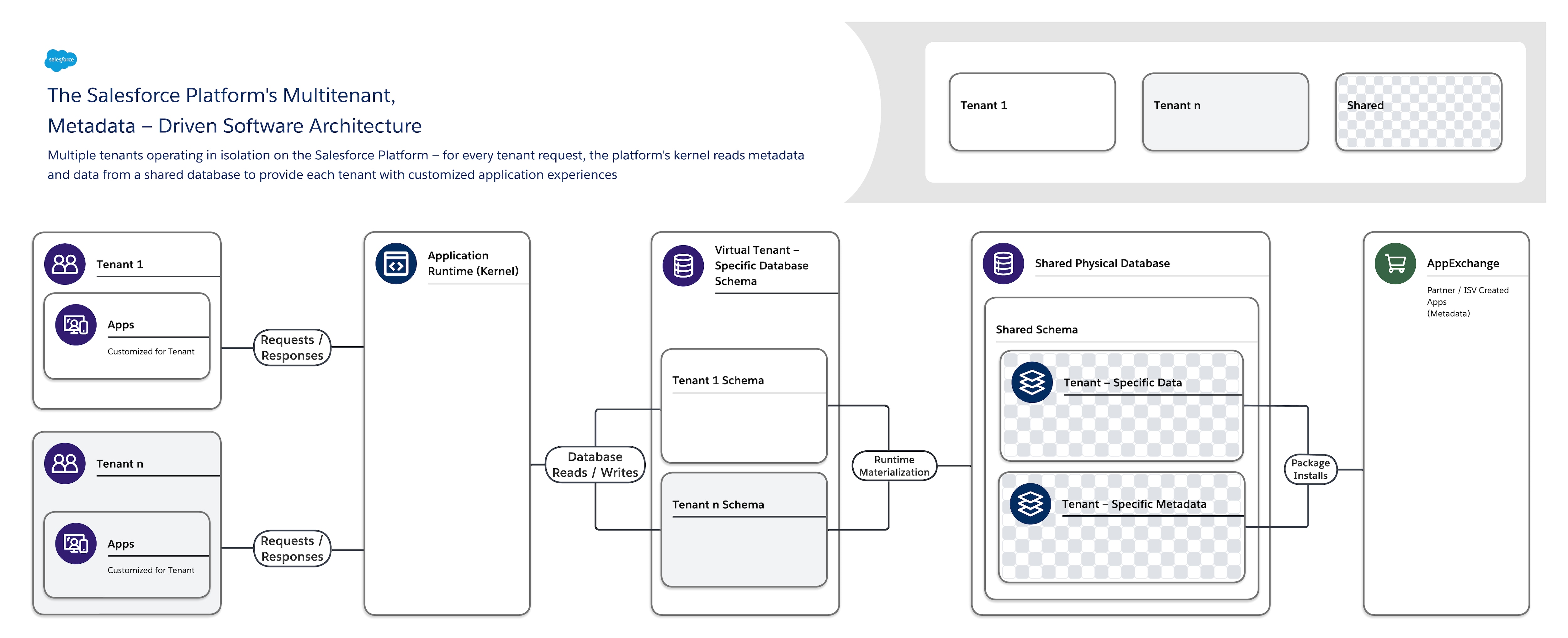
The diagram above illustrates how many orgs are routed through shared application and database layers while remaining logically isolated.
Virtual Isolation Through Orgs
Salesforce does not create a separate physical database or server for each customer. Instead:
- All orgs run on shared infrastructure
- Every request is evaluated in the context of a specific org
- Data access, logic, and UI behavior are scoped to that org
From a developer’s perspective, this feels like having a dedicated Salesforce instance—even though it’s shared behind the scenes.
What this means for developers: You don’t manage infrastructure, but every line of code you write runs alongside other tenants. Efficiency and correctness matter at the platform level, not just within your org.
Governor Limits and Resource Isolation
One of the most important consequences of a shared platform is resource fairness. Salesforce enforces this through governor limits.
Why Governor Limits Exist
Because infrastructure is shared:
- No single org can monopolize CPU, memory, or database resources
- Overall platform stability is protected for all tenants
Common Governor Limits
- SOQL query limits per transaction
- CPU time limits
- Heap size limits
- DML operation limits
What this means for developers:
- Bulkification is mandatory, not optional
- Inefficient Apex can fail even if it works in small test cases
A common real-world failure pattern is writing non-bulkified triggers that work for single-record updates but exceed limits during data loads or integrations. This is not an edge case—it’s a predictable outcome of ignoring shared resource constraints.
Governor limits are how Salesforce enforces safe, predictable behavior across tenants.
Metadata-Driven Architecture: The Core of the Platform
The real differentiator in Salesforce’s design is its metadata-driven architecture.
What Is Metadata in Salesforce?
Metadata defines how your org behaves, not the data itself. Examples include:
- Custom objects and fields
- Page layouts and Lightning pages
- Validation rules
- Flows and Apex code
- Security settings
Why Metadata Enables Multi-Tenancy
Instead of hard-coding behavior per customer, Salesforce uses a single runtime that interprets metadata at execution time. In practical terms:
- There is one shared execution engine
- Behavior changes dynamically based on org metadata
- Platform upgrades apply once, for everyone
Key insight for developers:
The primary differentiator between Salesforce orgs is metadata, not separate codebases or infrastructure.
What this means for developers: Favor configuration and metadata-driven features where possible. They are inherently upgrade-safe and align with how the platform scales.
Shared Infrastructure and Database Model

Salesforce uses a shared database architecture with strict logical isolation.
What’s Shared
- Application servers
- Database infrastructure
- Platform services (authentication, reporting, automation)
What’s Isolated
- Tenant data (row-level isolation)
- Metadata
- Execution context
- Security rules
What this means for developers: You never write cross-tenant logic. All queries and transactions are automatically scoped to your org, but inefficient queries still consume shared resources.
Security and Data Isolation
Security is foundational to the platform’s design.
How Isolation Is Enforced
Salesforce enforces isolation at multiple levels:
- Org-level isolation – tenants never see each other
- Object- and field-level security
- Record-level sharing rules
- Execution context enforcement
Every data access request is evaluated using:
- Tenant ID
- User permissions
- Sharing model
- Metadata rules
What this means for developers: Security is declarative by default. Custom code must respect sharing and execution context, or it can unintentionally bypass important controls.
Scalability Benefits for Builders
Because Salesforce is multi-tenant:
- Platform upgrades happen automatically
- New features are rolled out globally
- Performance improvements benefit all orgs
- Infrastructure scales with demand
From an architectural perspective, this enables:
- High availability
- Consistent performance baselines
- Innovation without customer-managed upgrades
What this means for developers: You design for longevity, not version lock-in. Solutions that align with platform patterns age better over time.
Why Multi-Tenancy Matters for Salesforce Developers
Understanding the platform’s architecture directly influences how you build:
- Favor configuration over custom code
- Use metadata-driven tools like Flows and validation rules
- Write bulk-safe Apex from the start
- Design with shared resources in mind
When you align with these constraints, your solutions are more scalable, secure, and resilient to change.
Conclusion: Designing With the Platform, Not Against It
Salesforce’s architecture is intentionally optimized for shared execution at scale. For developers and architects, the key takeaway is not just how the platform works, but how those design choices affect everyday development.
Teams that understand and embrace these constraints build solutions that scale predictably, survive upgrades, and perform well under real-world load. That applied understanding is what turns platform knowledge into durable, production-ready design.
Leave a Reply